SECURE EMAIL ENCRYPTION SOLUTIONS

S/MIME Certificates

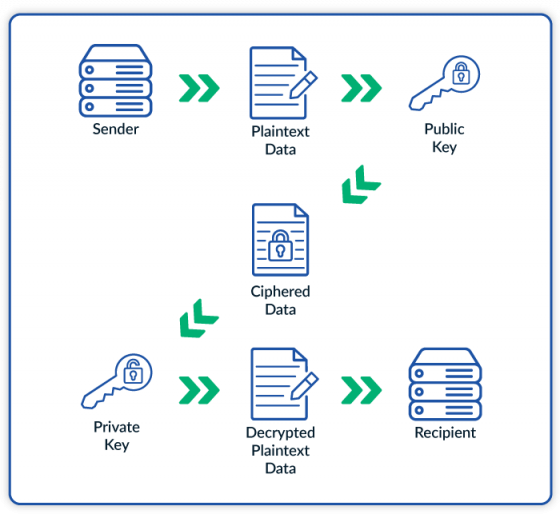
Using encryption and digital signatures, Secure/Multipurpose Internet Mail Extensions (S/MIME) certificates ensure email security, confidentiality, and integrity. The S/MIME certificate uses the recipient’s public key to encrypt the message and only the intended recipient’s private key can decrypt the message. This allows the sender to be confident that the signed email message will only be read by the intended party, and the receiver to verify the integrity and claimed origin of the message.

It’s crucial for both businesses and individuals to secure email communications and ensure message integrity. Whether you’re an individual, startup, small business, or enterprise, Sectigo offers S/MIME email certificate options that will meet your needs.

Sectigo is a leading S/MIME certificate provider and our secure email certificates are supported by all major mail applications including Microsoft Outlook, Exchange, Apple Mail, popular mobile operating systems, and more.
Personal Email Security (S/MIME)

Validation Requirements

  1. A desktop or laptop computer is recommended for collecting your email signing certificate (as opposed to a mobile phone or tablet).
  2. Certificates can be ordered using any modern browser, such as Firefox, Edge, Chrome, Opera, or Safari.
  3. Use the same system for ordering and collecting the certificate in pkcs12 format. The private key is stored in the Crypto store of the machine from which the order was placed. The PKCS 12 file is protected using a password and can be transferred securely to other systems.

When ordering a Sectigo secure email certificate, you must submit a Certificate Signing Request (CSR).

A CSR (PKCS#10) is a standardized way to request signed certificates from a certificate authority. A CSR is a file that contains the public key of the subject of the certificate along with other certificate attributes like Subject Name, Public Key Algorithm, etc.

You can submit a CSR that you created yourself, or it can be generated for you on the Sectigo website during the order process.

The process for ordering and collecting your certificate has four stages:

  1. Order the certificate. At checkout, enter the registered domain of your email address (the part after the @) in the Primary Domain field. For example, for Alice.Bob@example.com you would enter example.com
  2. Request the certificate. You must provide your personal details for the certificate, along with a CSR.
  3. Download the certificate.
  4. Install the certificate.

Note: Due to the validation requirements, there may be a delay between when you place your order and when you receive your certificate.

Once the order is submitted, it is validated by Sectigo. While it is being validated, the order status is Pending.

An order confirmation email will be sent to your registered email address, where you can use the Validation Manager button to check the status of your order.

Once the order has been approved, its status will change to Active. You can proceed to create the certificate request.

How they work

S/MIME certificates use asymmetric encryption to ensure email security. When an email is sent, the sender encrypts the message with the recipient's public key, and only the recipient’s private key can decrypt it, ensuring confidentiality. Additionally, S/MIME certificates can be used to digitally sign emails. In this case, the sender uses their private key to create a signature based on the email’s content, which verifies the authenticity of the message and ensures that the contents remain unaltered.